The Ultimate Guide to Downloading Instagram Videos: A Step-by-Step Tutorial

In today’s digital world, saving your favorite Instagram videos for offline viewing or sharing is a common need. This guide provides a clear, step-by-step tutorial on how to download videos from Instagram, breaking down the process into simple, actionable steps. We’ll walk you through the essential tools and methods, ensuring you can save content safely and efficiently, whether you’re on a mobile device or a computer.

Understanding the Basics of Instagram Video Downloading
Before diving into the process, it’s crucial to understand the fundamentals. Downloading content from social media platforms involves using third-party tools, as Instagram itself does not provide a native download button for most posts. The key is to find a reliable application or website that can fetch the video file from the post’s link.
The process generally involves copying the shareable link of the specific Instagram video you wish to save. This link is then pasted into the designated field of a downloading tool. The tool processes the link, extracts the video file, and provides you with an option to save it to your device’s storage. It’s a straightforward concept that hinges on having the correct link and a trustworthy service.
Choosing the Right Tool for the Job
Selecting a safe and effective application is the most critical step. With numerous options available, from mobile apps to browser-based websites, making the right choice ensures both the quality of the downloaded video and the security of your device.
- For Mobile Users (Android & iOS): Several dedicated apps are available on official app stores. Look for apps with high ratings, positive reviews, and a clear privacy policy. Always download from official app stores like Google Play or the Apple App Store to avoid malicious software.
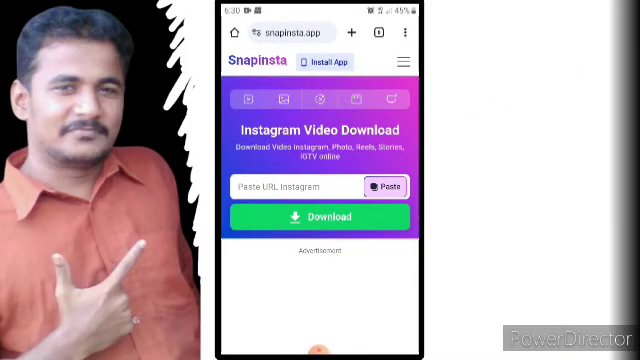
- For Desktop/Web Users: Many websites offer this service without requiring any software installation. You simply visit the site, paste the Instagram link, and download the video directly to your computer. Ensure the website uses a secure connection (look for “https://” in the address bar).
The core functionality remains the same across most reputable tools: input the link, process, and download. The tutorial in the source video emphasizes navigating to the chosen app and preparing to paste the copied Instagram link.

The Step-by-Step Download Process
Let’s break down the actual download process into a simple, numbered guide. Following these steps will help you successfully save any public Instagram video.
- Find and Copy the Video Link: Open the Instagram app and navigate to the video post you want to download. Tap the three dots (
...) or the paper airplane icon (share) above the post. From the menu that appears, select “Copy Link” or “Copy Share URL.” - Open Your Downloader Tool: Launch the downloading application you have chosen or navigate to the website on your browser.
- Paste and Process: Tap or click on the input field within the downloader app/website. Paste the Instagram link you copied. Then, press the button to analyze or fetch the video. This may be labeled “Download,” “Paste Link,” or “Go.”
- Select Quality and Download: After processing, the tool will typically display the available video quality options (e.g., Standard Definition, High Definition). Choose your preferred quality and tap the download button. The video file will then be saved to your device’s gallery or designated downloads folder.
The video guide confirms this sequence, highlighting the moment the link is processed and the download option becomes available. Patience during the processing step is key, as it can take a few moments depending on the video size and your internet connection.
Important Considerations and Best Practices
While the process is simple, responsible use is paramount. Keep these important points in mind:
- Respect Copyright: Only download content for personal, offline viewing. Do not repost downloaded videos as your own or use them for commercial purposes without explicit permission from the original content creator.
- Privacy Matters: Never attempt to download videos from private accounts. This is a violation of the user’s privacy and the platform’s terms of service.
- Device Security: Be cautious of tools that request excessive permissions. A video downloader should not need access to your contacts, messages, or call logs. Stick to well-reviewed, popular tools.
The tutorial concludes by emphasizing the completion of the process, showing that the video is now accessible in the device’s local storage, ready to be viewed anytime, even without an internet connection.

Conclusion
Downloading Instagram videos is a simple and useful skill when done correctly and ethically. By following the clear steps outlined—copying the post’s link, using a reputable downloading tool, and respecting content creators’ rights—you can easily build a personal library of your favorite clips. Remember to prioritize security by choosing trusted apps and websites, and always use downloaded content responsibly. With this knowledge, you’re now equipped to save and enjoy Instagram videos on your own terms.